
How Payback Works
Scan the receipt in Payback, add your friends, and assign each item to the right person. Review the split, then send payment requests through Venmo or CashApp.
Scan the Receipt
Open Payback and point your camera at the receipt. The AI reads every item name and price automatically — no manual entry needed. Works with restaurant receipts, grocery stores, and most retail formats.
- AI-powered OCR reads item names and prices
- Works with crumpled, faded, or handwritten receipts
- Edit any item manually if needed
- Add items that aren't on the receipt

Add Your Friends
Select which friends are splitting this bill. Choose from your saved contacts in Payback or add new ones on the spot. You only need to add someone once — they're saved for every future split.
- Import directly from your phone contacts
- Save friends with their Venmo or CashApp usernames
- Create groups for recurring splits (roommates, coworkers)
- Add people mid-split if someone joins late
Assign Items
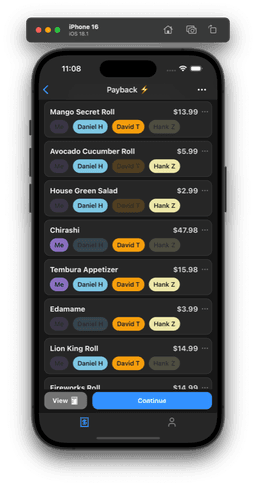
Tap each item to assign it to the person who ordered it. Shared items — appetizers, drinks, desserts — can be split across multiple people with a single tap. Tax and tip are automatically distributed proportionally.
- Tap an item to assign it to one person
- Long press or use the split button to divide shared items
- Tax and tip split proportionally by default
- See each person's running total update in real time
Send Payment Requests
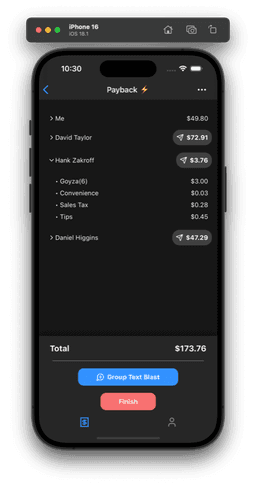
Hit Group Text Blast and everyone gets a payment request simultaneously — via Venmo, CashApp, or a text message with a Payback link. No copy-pasting amounts. No follow-up texts.
- Venmo: opens Payback with the exact amount pre-filled
- CashApp: opens with the correct dollar amount
- Payback link: works for anyone, no app required
- Group text sends all requests at once
More Features
Recurring Paybacks
Set a weekly or monthly reminder for recurring expenses — rent, utilities, subscriptions. Payback notifies you when it's time to split again and pre-fills last time's details.
Saved Friends & Groups
Add friends once with their Venmo and CashApp usernames. Create groups for recurring splits. Payback history shows who has paid and who still owes.
Track Who's Paid
Mark friends as paid in Payback history. See at a glance who has settled up and who still owes — no spreadsheet or memory required.
Payback Link
Share a Payback link via text. Recipients see exactly what they owe and can pay via Venmo or CashApp without downloading the app.
Quick reference
- Steps
- 4 steps
- Time
- Under 2 min
- Fairness
- Per-item split
- Cost
- Free
Common questions
How long does it take to split a bill with Payback?
Under 2 minutes from scan to everyone receiving a payment request. Scanning takes about 10 seconds; assigning items to a group of 4 takes 30–60 seconds; sending requests via Group Text Blast is one tap.
Do I need to enter receipt items manually?
No. Payback reads every item name and price automatically using AI OCR. You can edit any item if the scan misreads something, but most receipts scan correctly without correction.
How does Payback split tax and tip?
Tax and tip are split proportionally by default — if your food subtotal is 30% of the table total, you pay 30% of the tax and tip. You can switch to an even tax/tip split before sending requests.
What is Group Text Blast?
Group Text Blast sends payment requests to every person in the split simultaneously — via Venmo, CashApp, or a text message with a Payback link. One tap instead of sending individual requests to each person.
What if someone doesn't have Venmo or CashApp?
Send them a Payback link via text instead. They open it in their browser, see what they owe, and can pay through Venmo or CashApp without downloading anything. No account required on their end.